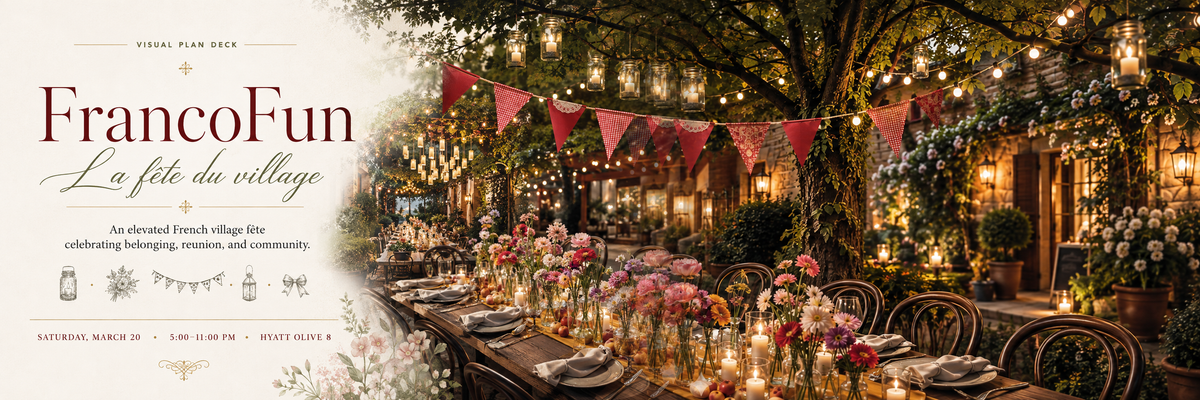
Use this banner and letterhead as a composition reference: a calm area for the message, an atmospheric garden image, and small decorative details that bring the two together.
123
Banner & letterhead / 1200 × 400
One composition, three connecting details
The curved fade joins image and solid color. Flowers frame the canvas. Icons add the character of a village fête without competing with the message.
1
A curved, feathered transition
The cream panel gives the signature and copy a quiet background. Its edge curves inward through the middle and opens out toward the top and bottom, allowing the garden to flow around it.
The curve sets the shape. Use a smooth, flowing contour to divide the solid-color area from the image. Leave enough solid color behind the logo, copy, and event details.
The fade softens the edge. Layer a soft, feathered edge over the garden beside the solid panel. Let that color move from opaque to transparent so the image gradually shows through, with no sharp seam.
Keep the message crisp. Apply the fade at the boundary. Keep text and the logo fully visible, and adjust the curve and softness for the final canvas size.
2
Flowers at the canvas edges
The transparent watercolor cluster sits above both the cream panel and garden, near the bottom of their transition. Blush, cream, and sage connect the illustration to the scene.
Anchor the arrangement to a border. Let a few petals, leaves, or stems extend beyond the canvas and crop them at the edge. This makes the flowers feel part of the composition.
Use clusters to frame the content. Start with one bottom-edge arrangement, as shown here. In other formats, a corner or side-edge cluster can create the same effect; leave open space between arrangements.
Protect the reading area. Keep flowers clear of the signature and practical information. Preserve their proportions and transparent background so they overlap the layout naturally.
The mason jar, floral spray, bunting, lantern, and bow form a centered row between the descriptive copy and event details. Their fine, understated artwork adds a festive pause in the reading order.
Keep the row visually balanced. Give the icons similar apparent heights, preserve each illustration’s proportions, and space them evenly on the solid-color panel.
Let them support the message. Keep the icons smaller and quieter than the signature. Give the row breathing room above and below, with the date, time, and location clearly separated.
Adapt the set to the format. Use individual icons from the imagery library. For a narrow canvas, choose fewer icons rather than shrinking the whole row until its details disappear.
Download the reference image or the complete editable composition.
PNG · 1.2 MB
ZIP · 3.3 MB
Extract the editable source ZIP before opening the HTML. It contains every referenced image and its adjacent stylesheet, including the curved solid-color panel and softened edge. Save permanent changes in the HTML/CSS files. Use the current logo and imagery downloads from this guide when creating a new layout.